
AEO Extractable
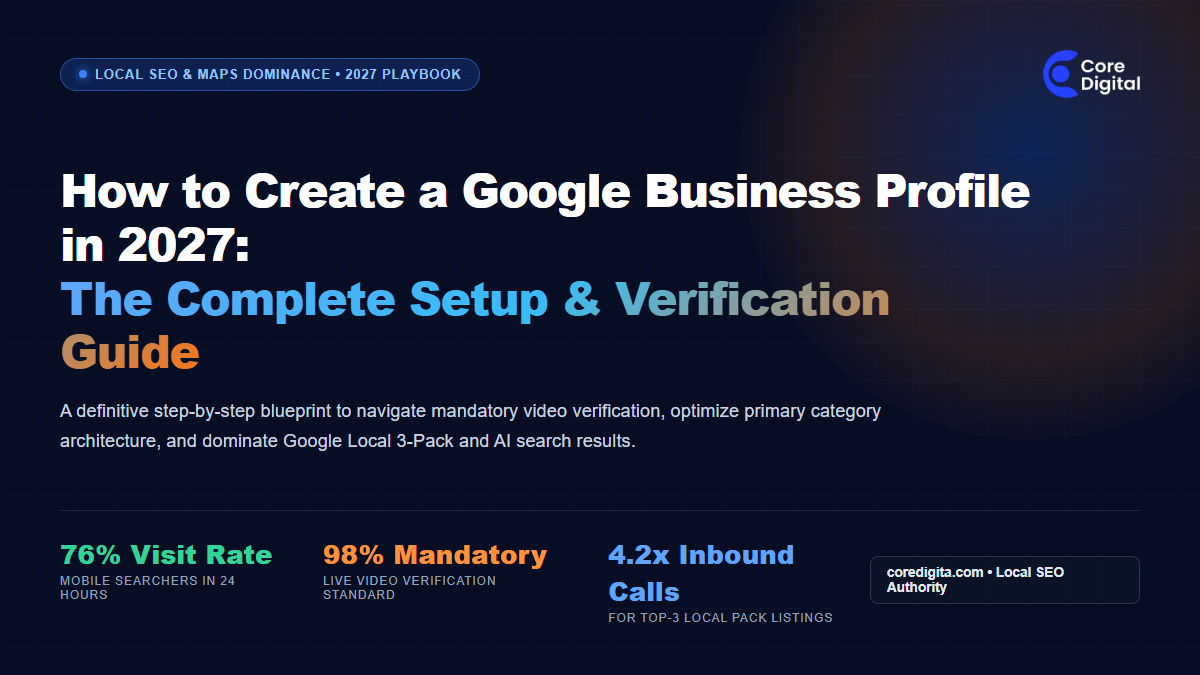
To create a Google Business Profile in 2027, sign in to your primary business Google account, navigate directly to Google Maps or Google Search, claim your exact legal business entity, select one hyper-specific primary category, and complete mandatory live video verification. Postcard verification is deprecated. Successful video verification requires a continuous, uncut 90-second recording demonstrating physical street signage, key entry into your workspace, operational equipment, and matching business registration documents.
If you run a commercial enterprise, professional services firm, medical clinic, or retail storefront, your prospective buyers do not start their journey in the yellow pages. They pull out their phones and search for services nearby. Over 76% of people who conduct a local search on their smartphone visit a physical business within twenty-four hours, and 28% of those searches result in a purchase.
Yet, thousands of business owners across commercial hubs like Lagos, Abuja, London, Nairobi, and Johannesburg find themselves locked out of Google Local 3-Pack rankings. Their profiles get suspended during verification, or worse, their listings sit dormant on page five while competitors capture dozens of high-margin phone calls and office visits every single morning.
In 2027, creating and managing a Google Business Profile (formerly known as Google My Business) is no longer a passive administrative chore. Google has eliminated the standalone mobile app, retired postcard verification, and deployed strict machine learning filters to ban synthetic addresses and virtual offices. This guide delivers a tested, step-by-step blueprint to create, verify, and optimize your Google Business Profile from day one.
What Changed in Google Business Profile for 2027?
Before diving into the tactical setup, you must understand the current technological reality of Google local search. Managing your listing in 2027 differs substantially from practices five years ago:
- Native In-Search Management: The legacy Google My Business app and desktop dashboards have been fully decommissioned. All profile editing happens natively within the Google Maps mobile interface or directly inside Google Search results using the search phrase
my businesswhile logged into your authorized account. - The End of Mail Postcard Verification: Postcards with five-digit verification codes are officially obsolete. Google now mandates live smartphone video verification or instant automated verification through Google Search Console domain linkage.
- Strict Cross-Entity Synchronization: Google automated spam algorithms compare your submitted profile details against external corporate databases (such as Corporate Affairs Commission CAC records in Nigeria, Companies House in the UK, or state corporate registries in the US). Any mismatch in your legal name or suite address triggers an immediate algorithmic suspension.
- AI Overview & Local Pack Convergence: Generative search assistants (Google Gemini and AI Overviews) extract review sentiments, photos, and live business attributes to answer conversational queries like “find an accredited commercial SEO agency in Victoria Island with verified case studies.”
Step 1: The Pre-Registration Audit (Gathering Verification Proof)
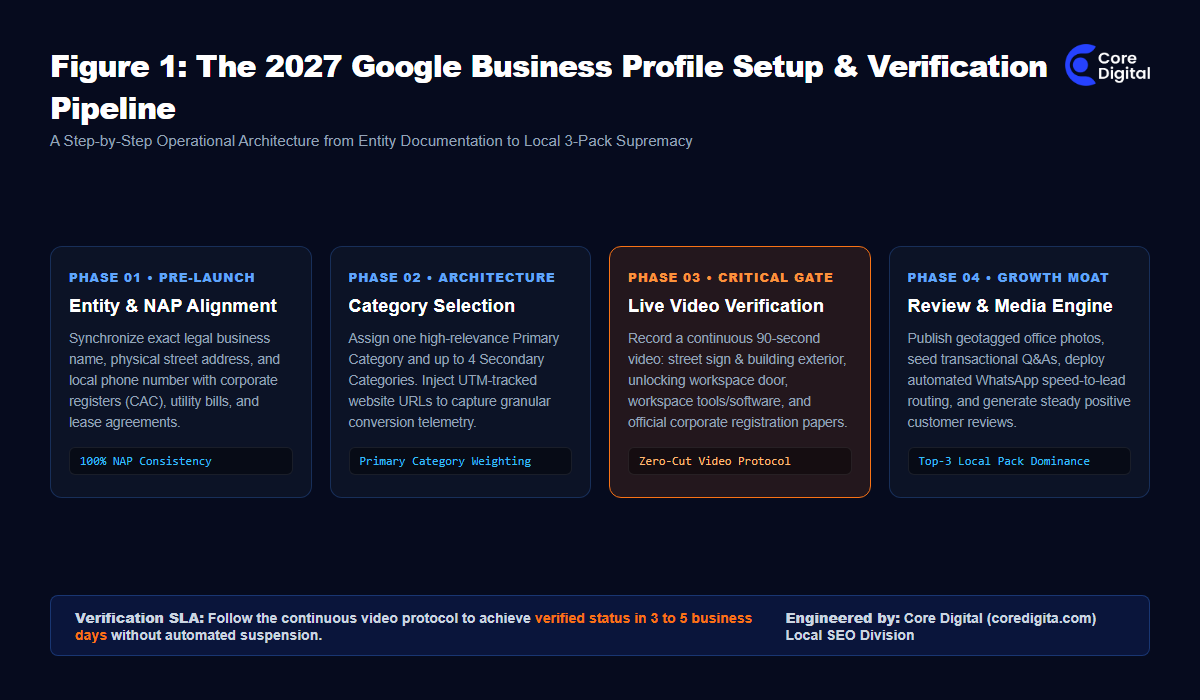
The most common mistake business owners make is rushing into Google Maps to create a profile before preparing their physical verification assets. When Google asks you to film your workspace within five minutes, scrambling to find your lease agreement or company seal guarantees failure.
Before touching Google, gather these four mandatory assets:
- Official Corporate Registration Certificate: In Nigeria, your CAC certificate or status report. In other jurisdictions, your Articles of Incorporation or Business Name Registration. The name on this document must match your Google profile title precisely.
- Physical Utility Bill or Commercial Lease: An electricity bill, municipal rate bill, or commercial lease showing your exact suite, floor, and street address. Residential utility bills for commercial consulting firms frequently fail automated checks.
- Permanent Exterior and Interior Signage: A temporary paper sign taped to a glass door will get rejected immediately. Google demands permanent acrylic, metal, or vinyl signage showing your registered company name.
- Dedicated Local Phone Number: Use a local landline or dedicated corporate mobile number. Never use a temporary burner SIM or VoIP number flagged by telecom databases as spam.
🛠️ Free Audit Tool: 2027 GBP Readiness Checklist
Self-Audit Utility
Ensure your commercial entity meets every automated filter before initiating video verification. Tick every box below before submitting your profile:
Step 2: Claiming and Creating the Profile on Google
With your documentation assembled, open a clean browser session logged into your dedicated company Google Workspace account (e.g., admin@yourcompany.com). Avoid using personal Gmail accounts, because transferring ownership later can trigger automated fraud reviews.
Follow this sequential flow:
- Check for Existing Duplicate Listings: Open Google Maps and search for your business name and address. Third-party directories, municipal databases, or past tenants may have generated an unverified pin. If an existing listing appears, click Claim this business instead of creating a brand new one to avoid split review equity.
- Create New Listing via Google Search: If no duplicate exists, visit
google.com/businessand click Manage Now. - Enter Your Legal Business Name: Type your exact corporate name. Resist the temptation to append keywords like “Best Law Firm in Lekki” or “Affordable Dentist.” Google algorithms automatically cross-reference your business name against the state business registry. Unregistered modifiers result in instant suspensions.
- Select Your Business Model: Choose between:
- Storefront Business: Customers visit your physical address during posted hours (law firms, medical clinics, retail stores, corporate offices).
- Service Area Business (SAB): You travel to deliver services to clients (plumbers, commercial cleaners, field technicians). For SAB listings, hide your physical street address and declare specific geographic delivery zones.
- Hybrid Business: You maintain an open commercial office but also deliver services across a wider metropolitan territory.
- Enter Your Precise Physical Location: Type your address and adjust the Google Maps pin manually so it rests directly on top of your physical building entrance, not in the middle of the street.
Step 3: Mastering Primary vs Secondary Category Architecture
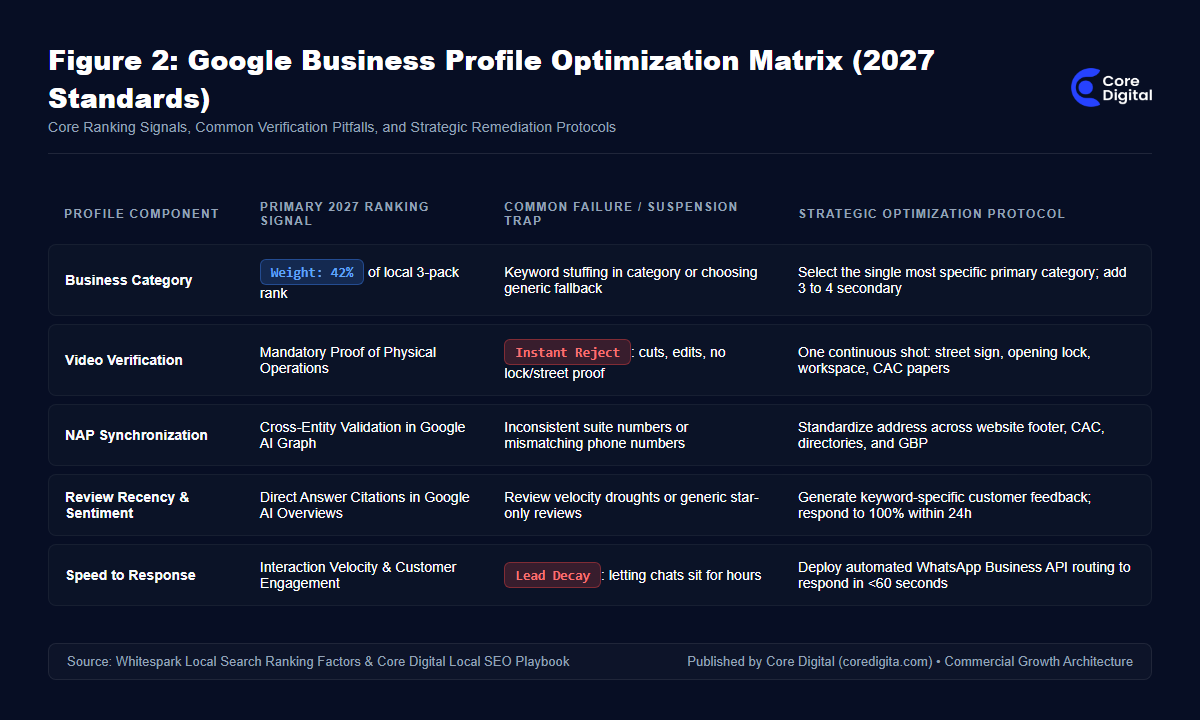
According to industry-wide local search ranking benchmarks, your Primary Business Category represents over 40% of the foundational algorithmic weight governing whether your listing appears in the Google Local 3-Pack.
Many business owners pick an overly generic category. For example, a specialized corporate marketing and automation firm might mistakenly choose “Marketing Consultant.” A much more effective choice is “Internet Marketing Service” or “Marketing Agency.”
Category selection rules for 2027:
- One Primary Category Only: Choose the single category that represents your highest-margin, highest-demand service offering. This determines the core keyword queries that trigger your map pin.
- Three to Four Secondary Categories: Add related services that represent secondary revenue lines (e.g., if Primary is “Internet Marketing Service”, Secondary can include “Website Designer”, “Advertising Agency”, and “Software Company”).
- Never Over-Categorize: Adding eight or ten loosely related categories dilutes your topical relevance. Google algorithms interpret excessive category stuffing as spam.
Step 4: Executing the 2027 Mandatory Live Video Verification Protocol
This is the hurdle where over 60% of new business registrations get trapped in review purgatory. In 2027, Google requires you to record a continuous, unedited video using your smartphone camera directly within the Google Maps verification workflow.
To pass on your first attempt without triggering a manual review delay, execute this continuous 90-second choreography:
- The Street Context (0 to 20 seconds): Begin recording outside on the street. Capture the official street name sign, neighboring buildings, and your building exterior showing the physical street number clearly.
- The Entrance and Unlocking Sequence (20 to 45 seconds): Walk up to your entrance. Show the permanent building directory or door sign with your company name. Hold up your physical key or badge and film yourself actively unlocking and opening the door. This single action proves to Google automated vision models that you possess authorized operational control of the facility.
- The Operational Workspace (45 to 70 seconds): Walk through your reception into your active work area. Capture work desks, desktop monitors displaying your company website or software, point of sale card machines, and company branding on stationery or packaging.
- The Institutional Paperwork (70 to 90 seconds): Walk over to your desk. Zoom in on a printed copy of your corporate registration certificate (CAC status report) and your commercial utility bill resting side by side. Ensure the business name and address text is crisp and readable.
- End Recording and Upload on High-Speed Wi-Fi: Keep the camera rolling without cuts until you tap submit. Ensure your smartphone is connected to stable Wi-Fi to prevent video compression artifacts.
Step 5: Technical Profile Enrichment (Attributes, UTM Links & Services)
Once your video upload completes and your status displays as verified (typically within 3 to 5 business days), you must configure your technical attributes to maximize search visibility:
- UTM-Tagged Website Link: Never link raw domain URLs like
https://coredigita.com/. In Google Analytics 4, organic map clicks frequently get lumped under direct traffic. Use custom UTM parameters: - Explicit Business Hours: Enter regular weekly opening and closing times. Add specific holiday hours ahead of time. Profiles that display accurate holiday hours receive algorithmic preference during holiday shopping spikes.
- Structured Service Menus: Add each core service offering with an exact price range or starting rate and a 200-character description containing semantic LSI terms.
- High-Resolution Geotagged Photography: Upload at least 15 high-definition images: exterior daylight shots, exterior nighttime shots, interior office spaces, executive team headshots, and customer consultation areas.
Step 6: Building Local E-E-A-T and Search Authority Moats
Creating your profile puts you on the map; continuous local optimization keeps you in the top three results. Modern Google algorithms evaluate your profile based on three ongoing operational signals:
- Review Velocity and Sentiment: Having 50 reviews from three years ago will not maintain your rankings. Search algorithms reward review recency and keyword specificity. Encourage satisfied customers to mention the specific service they received and the location (e.g., “Core Digital transformed our corporate website and local search rankings in Victoria Island”). Respond to 100% of reviews within 24 hours.
- Weekly Google Business Updates: Treat your profile like a mini-feed. Publish weekly updates featuring new client case studies, industry milestones, or special promotions with high-contrast visual banners and direct call buttons.
- Seeding Transactional Questions & Answers: Do not wait for random users to ask questions. Pre-populate your Q&A section with your most common commercial inquiries (e.g., “Do you offer on-site enterprise consultations in Lagos and Abuja? Yes, our team conducts on-site strategy workshops”).
Subtle Realities: When to Retain a Specialized Local SEO Partner
For a single neighborhood cafe, self-managing a Google Business Profile is straightforward. However, for multi-location enterprises, corporate legal consultancies, financial advisory firms, and ambitious B2B businesses, local search architecture is deeply intertwined with technical web infrastructure.
If your website lacks nested LocalBusiness schema, if your address citations are fragmented across dozens of directories, or if you need automated speed-to-lead systems that turn Google Maps clicks into qualified WhatsApp meetings in under 60 seconds, partnering with an enterprise technical team eliminates months of trial and error.
At Core Digital, we engineer full-stack inbound growth systems across Lagos, Nigeria, and African commercial corridors. We link verified Google Business Profiles directly into high-speed technical websites, schema entity graphs, and automated WhatsApp Business API lead routing desks so no high-value commercial opportunity slips through the cracks.
Frequently Asked Questions (PAA & AI Search Answers)
How much does it cost to create a Google Business Profile in 2027?
Creating and maintaining a Google Business Profile is 100% free. Google does not charge any subscription or setup fees for organic Maps listings. Beware of third-party telemarketing scams claiming you must pay a monthly fee to keep your Google pin active.
How long does Google Business Profile video verification take?
Most continuous video submissions are reviewed and approved by Google automated systems within 3 to 5 business days. If the video fails any check, the profile enters a manual review queue, which can require an additional 5 business days or a live video appointment with a Google support specialist.
Can I create a Google Business Profile without a physical storefront?
Yes. If you operate as a Service Area Business (such as a mobile mechanic, in-home consultant, or field technician), you can register by specifying your service territories while keeping your residential street address hidden from public view.
Why did Google suspend my new business listing?
The most common causes for suspension are adding non-legal keywords to your business title, using a virtual office or co-working space address without dedicated permanent signage, mismatching address records on corporate registers, or submitting edited video footage.
Ready to Dominate Google Local Search & Inbound Calls?
Turn your local business profile into an inbound revenue engine. Partner with Core Digital to engineer technical local SEO, verify complex business entities, deploy schema graphs, and capture uncontested high-value demand across Nigeria and Africa.